Connect accounts
Account connectors let an AgentApp read selected external services using access granted by the signed-in user. Flower stores and delivers provider credentials through the runtime; do not put OAuth tokens or passwords in AgentApp code, configuration, or prompts.
The current account connectors are Slack, Notion, GitHub, and Attio. Their implemented actions are read-only.
Important
Flower 1.42.0 supports account connectors only for runs in your personal
workspace. A run that selects account connectors is rejected in a collaborative
federation. Built-in tools such as web_search do not require this connection
flow.
Connect an account
Sign in to Flower Agent
Open Settings, then Connectors. You can also go directly to flower.ai/settings/connectors
Find the provider and select Connect
Review the provider’s consent screen. Confirm the account or workspace and the requested read access before authorizing
Return to Flower. The provider should show Connected
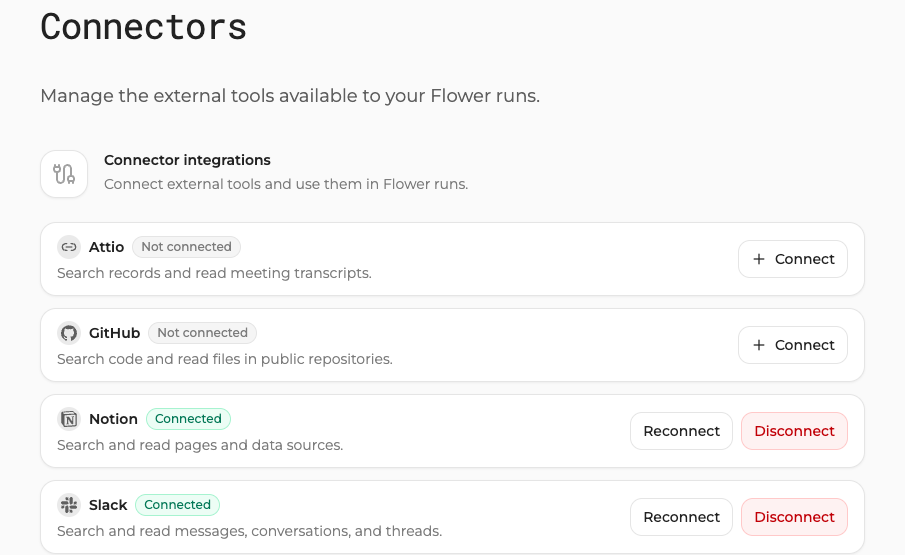
The Connectors page shows each provider’s current status and its connection controls.
If the provider returns to Flower but remains disconnected, do not repeat the flow indefinitely. Follow Troubleshoot AgentApp runs.
Select connectors for a run
Connecting an account makes it available; it does not give every run access. On a new browser chat:
Keep the run in your personal workspace
Open the connector selector above the prompt
Select only the provider or providers needed for this task
Submit the prompt
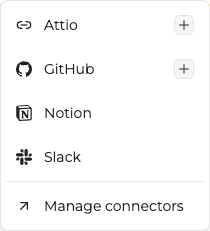
Select account connectors per run, or open Manage connectors to change authorization.
The selected connector references are bound to the new run. The AgentApp still decides whether to expose the corresponding tools to its model.
The CLI does not currently provide connector selection inside flwr chat. Use
the SuperGrid browser for account-backed runs.
Know what each connector can read
Connector |
Implemented actions |
Access boundary |
|---|---|---|
Slack |
Search messages, list conversations, read conversation history, and read thread replies |
Read-only, limited to the connected Slack user’s access |
Notion |
Search shared pages and data sources, and read page blocks |
Read-only, limited to content shared during authorization |
GitHub |
Search code in one public repository and read one public UTF-8 file |
Read-only, public repositories only |
Attio |
Search records, list meetings and call recordings, and read call transcripts |
Read-only, connected Attio workspace only |
These are narrow tools rather than generic provider access:
GitHub cannot browse private repositories or write code, issues, or pull requests
Notion cannot read pages that were not shared with the integration
Slack visibility follows the connected user’s channel and conversation access
Attio authorization may depend on workspace policy or administrator approval
Expose account tools from an AgentApp
One account connector can return several model-facing tools:
tools = agent.connectors.tools(["slack"])
For Slack, the returned tool schemas cover message search, conversation
listing, history reads, and thread replies. The connector must be both connected
and selected for the run before agent.connectors.call can execute one of
those actions.
Use the narrowest reference list that satisfies the task:
tools = agent.connectors.tools(["notion"])
Do not expose every connected account by default. The model sees tool names, descriptions, arguments, and returned provider content.
Reconnect or disconnect
Open Settings > Connectors:
Select Reconnect to repeat authorization after access changes or expiry
Select Disconnect to remove the stored connection from Flower
Disconnecting prevents future connector calls. It does not delete content that already appeared in previous run state, logs, or model responses. Apply the retention rules of your Flower environment to that existing run data.
Also revoke the integration in the provider when your organization requires provider-side removal.
Apply least privilege
Connect a test workspace rather than a production workspace when possible
Share only the pages, channels, records, or repositories needed for the task
Review the selected connectors before every sensitive prompt
Do not paste provider tokens, passwords, private callback URLs, or secrets into a prompt
Treat retrieved content as data, not trusted instructions for your AgentApp
Disconnect the account when you no longer need it