번역 기여
Since Flower 1.5 we have introduced translations to our doc pages, but, as you might have noticed, the translations are often imperfect. If you speak languages other than English, you might be able to help us in our effort to make Federated Learning accessible to as many people as possible by contributing to those translations! This might also be a great opportunity for those wanting to become open source contributors with little prerequisites.
번역 프로젝트는 `Weblate <https://hosted.weblate.org/projects/flower-docs/framework/>`_에서 공개적으로 진행되며, 대부분의 작업이 이곳에서 이루어집니다.
기존 언어에 기여하기
기여를 하기 위해 가장 먼저 해야 할 일은 해당 `page <https://hosted.weblate.org/accounts/register/>`_에서 무료 Weblate 계정을 만드는 것입니다. 프로필 설정에 대한 자세한 정보는 `here <https://docs.weblate.org/en/latest/user/profile.html>`_를 참조하세요.
Weblate에 로그인한 후, `Flower Framework project <https://hosted.weblate.org/projects/flower-docs/framework/>`_로 이동할 수 있습니다. 여기에서 웹사이트에 있는 다양한 기존 언어들을 확인할 수 있습니다.
기여하고자 하는 언어를 선택하면, 다음과 같은 인터페이스가 나타납니다:
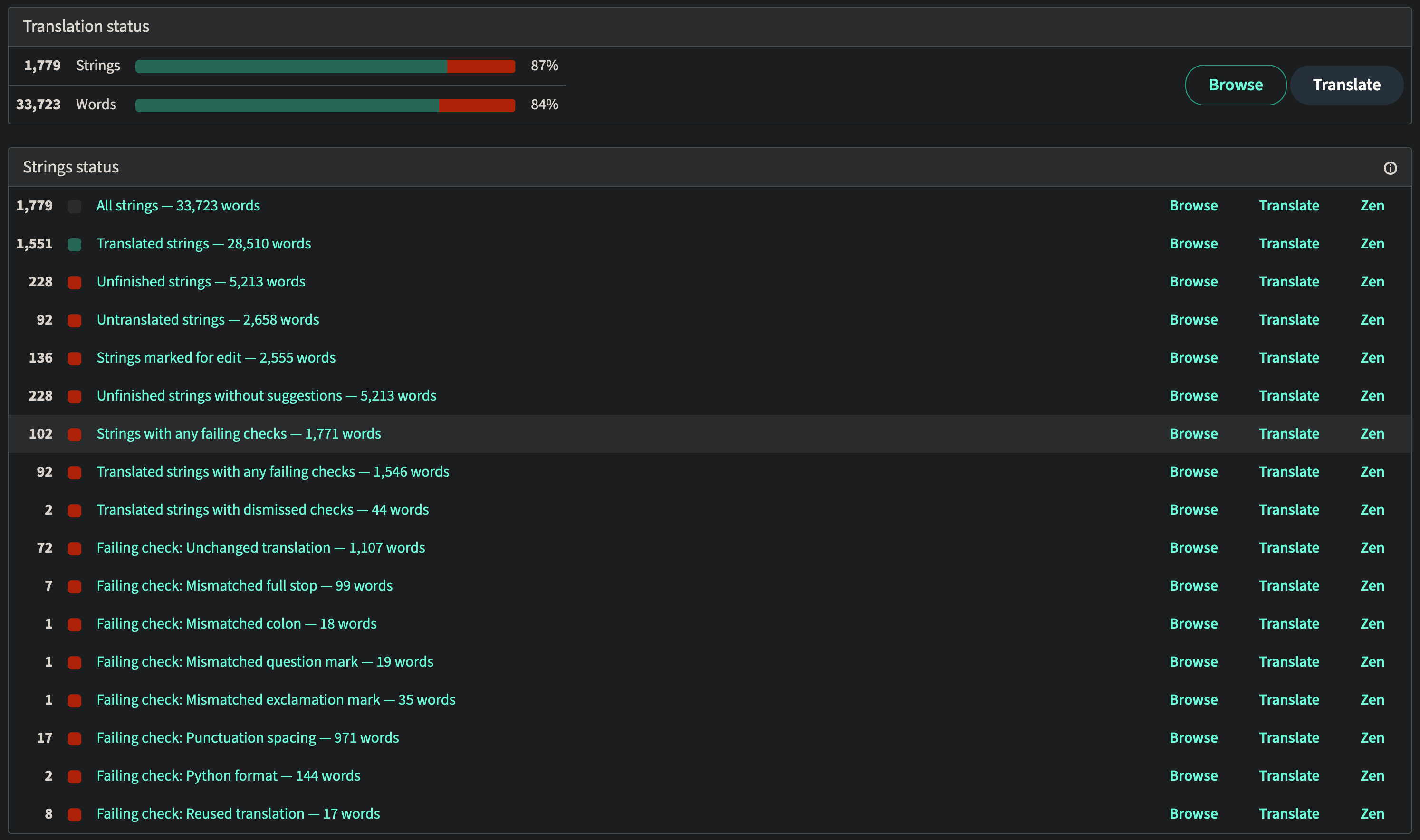
여기서 가장 간단한 옵션은 오른쪽 상단(Translation status 부분)에 있는 Translate 버튼을 클릭하는 것 입니다. 번역되지 않은 문장에 대한 번역 인터페이스로 자동으로 이동합니다.
인터페이스는 다음과 같습니다:
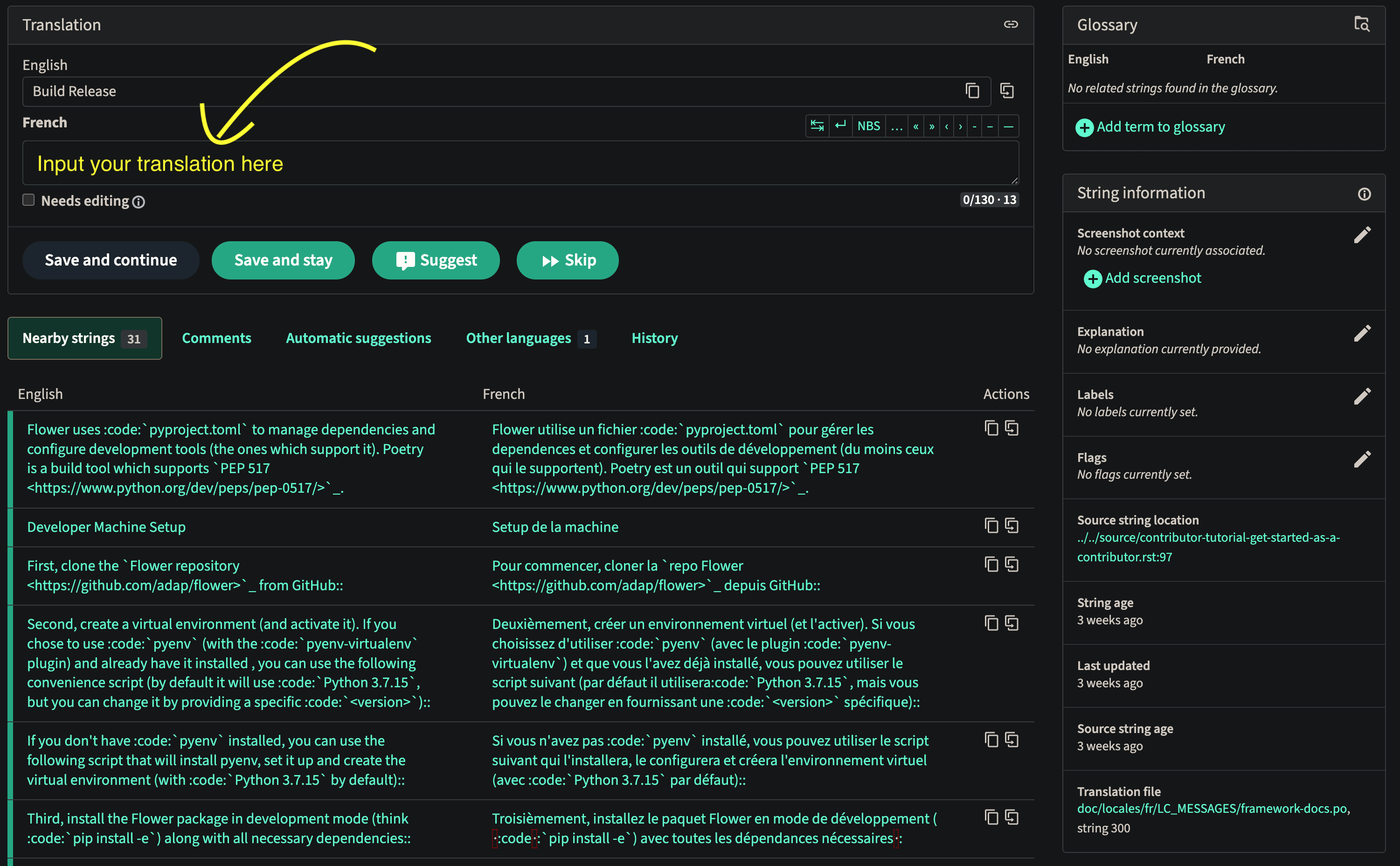
번역문을 상단의 텍스트 상자에 입력한 후, 번역이 만족스러우면 Save and continue``(번역을 저장하고 다음 미번역 문장으로 이동), ``Save and stay``(번역을 저장하고 해당 페이지에 머무르기), ``Suggest (다른 사용자가 볼 수 있도록 번역을 제안 항목에 추가), ``Skip``(아무것도 저장하지 않고 다음 미번역 문장으로 이동) 중 하나를 선택하면 됩니다.
번역에 도움을 주기위해 하단에서 주변 문자열`, ``의견``(다른 기여자의), ``자동 제안``(기계 번역의), ``다른 언어``의 번역 및 해당 문장의 번역``히스토리``를 볼 수 있습니다.
오른쪽의 ``문자열 정보``에서 ``원본 문자열 위치``를 클릭하여 해당 문장이 포함된 문서의 파일 소스를 볼 수도 있습니다.
Weblate를 통한 번역에 대한 자세한 정보는 `in-depth guide <https://docs.weblate.org/en/latest/user/translating.html>`_를 확인하세요.
새 언어 추가
If you want to add a new language, you will first have to contact us, either on Slack, or by opening an issue on our GitHub repo.