Contents Menu Expand Light mode Dark mode Auto light/dark, in light mode Auto light/dark, in dark mode Skip to content
Flower Framework
Light Logo Dark Logo
main

教程

  • 什么是联邦学习?
  • 开始使用Flower
  • Write your first Flower App
  • Write your first Flower App with PyTorch
  • 使用联邦学习策略
  • Customize a Flower Strategy
  • Communicate custom Messages
  • 快速入门教程
    • PyTorch快速入门
    • 快速入门 TensorFlow
    • Quickstart MLX
    • 🤗 Transformers快速入门
    • 快速入门 JAX
    • 快速入门Pandas
    • 快速入门 fastai
    • 快速入门 PyTorch Lightning
    • scikit-learn快速入门
    • XGBoost快速入门
    • Quickstart Android
    • Quickstart iOS

How-to Guides

  • Build
    • 安装Flower
    • Configure pyproject.toml
    • Configure a ClientApp
    • Design stateful ClientApps
    • 使用策略
    • 实施策略
    • 整合评估结果
    • Save and load model checkpoints
    • Use Built-in Mods
    • Use Differential Privacy
    • Implement FedBN
    • Use CLI JSON output
    • Install Flower App dependencies at runtime
    • OpenFL Migration Guide
    • 升级至 Flower 1.0
    • Upgrade to Flower 1.13
    • Upgrade to Message API
    • Upgrade to Flower 1.28
  • Simulate
    • Run Flower Locally with a Managed SuperLink
    • Run simulations
  • Deploy
    • Run Flower with the Deployment Runtime
    • Enable TLS connections
    • Authenticate SuperNodes
    • Configure logging
    • Run Flower on GCP
    • Run Flower on Azure
    • Run Flower on Red Hat OpenShift
    • Run Flower on Multiple OpenShift Clusters
    • Authenticate Accounts via OpenID Connect
    • Configure Audit Logging
    • Manage Flower Federations
    • Run Flower using Docker
      • Quickstart with Docker
      • Enable TLS for Secure Connections
      • Persist the State of the SuperLink
      • Set Environment Variables
      • Run with Root User Privileges
      • Run ServerApp or ClientApp as a Subprocess
      • Pin a Docker Image to a Specific Version
      • Use a Different Flower Version
      • Quickstart with Docker Compose
      • Run Flower Quickstart Examples with Docker Compose
      • Deploy Flower on Multiple Machines with Docker Compose
    • Run Flower using Helm
      • Deploy SuperLink
      • Deploy SuperNode
    • Create and Manage Federations on SuperGrid
    • Connect SuperNodes to SuperGrid
    • Run Flower Apps on SuperGrid

说明

  • 联邦学习评估
  • 差分隐私
  • 安全聚合协议
  • Flower的架构
  • SuperLink High Availability Mode
  • Flower Strategy Abstraction

参考资料

  • Reference
    • flwr
      • agentapp
        • AgentApp
        • AgentResponses
        • AgentSession
        • LoadAgentAppError
      • app
        • Array
        • ArrayRecord
        • ConfigRecord
        • Context
        • Error
        • Message
        • MessageType
        • 描述数据
        • MetricRecord
        • RecordDict
      • clientapp
        • ClientApp
        • mod
          • adaptiveclipping_mod
          • arrays_size_mod
          • fixedclipping_mod
          • message_size_mod
          • LocalDpMod
      • serverapp
        • Grid
        • ServerApp
        • strategy
          • Bulyan
          • DifferentialPrivacyClientSideAdaptiveClipping
          • DifferentialPrivacyClientSideFixedClipping
          • DifferentialPrivacyServerSideAdaptiveClipping
          • DifferentialPrivacyServerSideFixedClipping
          • FedAdagrad
          • FedAdam
          • FedAvg
          • FedAvgM
          • FedMedian
          • FedProx
          • FedTrimmedAvg
          • FedXgbBagging
          • FedXgbCyclic
          • FedYogi
          • Krum
          • MultiKrum
          • QFedAvg
          • Result
          • Strategy
    • Flower CLI reference
    • Flower Configuration
    • Example projects
    • 遥测功能
    • 更新日志
    • Flower Runtime Comparison
    • Flower Network Communication
    • Exit Codes
      • [0] SUCCESS
      • [1] GRACEFUL_EXIT_SIGINT
      • [100] SUPERLINK_THREAD_CRASH
      • [101] SUPERLINK_LICENSE_INVALID
      • [102] SUPERLINK_LICENSE_MISSING
      • [103] SUPERLINK_LICENSE_URL_INVALID
      • [104] SUPERLINK_INVALID_ARGS
      • [105] SUPERLINK_DATABASE_SCHEMA_MISMATCH
      • [2] GRACEFUL_EXIT_SIGQUIT
      • [200] SERVERAPP_STRATEGY_PRECONDITION_UNMET
      • [201] SERVERAPP_EXCEPTION
      • [202] SERVERAPP_STRATEGY_AGGREGATION_ERROR
      • [203] SERVERAPP_RUN_START_REJECTED
      • [250] CLIENTAPP_COMMUNICATION_ERROR
      • [3] GRACEFUL_EXIT_SIGTERM
      • [300] SUPERNODE_REST_ADDRESS_INVALID
      • [302] SUPERNODE_NODE_AUTH_KEY_INVALID
      • [303] SUPERNODE_STARTED_WITHOUT_TLS_BUT_NODE_AUTH_ENABLED
      • [304] SUPERNODE_INVALID_TRUSTED_ENTITIES
      • [400] SUPEREXEC_INVALID_PLUGIN_CONFIG
      • [401] SUPEREXEC_AUTH_SECRET_LOAD_FAILED
      • [402] SUPEREXEC_INVALID_EXECUTOR_CONFIG
      • [500] FLWRCLI_NODE_AUTH_PUBLIC_KEY_INVALID
      • [600] COMMON_ADDRESS_INVALID
      • [601] COMMON_MISSING_EXTRA_REST
      • [602] COMMON_TLS_NOT_SUPPORTED
      • [603] COMMON_TLS_ROOT_CERTIFICATES_INCOMPATIBLE
      • [604] COMMON_PATH_INVALID
      • [605] COMMON_TLS_SERVER_CERTIFICATES_INVALID
      • [606] RUNTIME_VERSION_INCOMPATIBLE
      • [607] COMMON_APP_IMPORT_ERROR
      • [608] COMMON_RUNTIME_DEPENDENCY_INSTALLATION_ERROR
      • [700] SIMULATION_EXCEPTION
      • [701] SIMULATION_MISSING_EXTRA
      • [800] TASK_PROC_EXCEPTION
    • 常见问题

贡献者文档

  • Contribute
    • 在 GitHub 上投稿
    • 成为贡献者
    • 安装开发版本
    • 建立虚拟环境
    • 使用 VSCode Dev Containers 进行开发
    • 编写文件
    • 发布 Flower
    • 贡献译文
    • How to Build Docker Flower Images Locally
    • Migrate Flower Database Schema
    • 公有和私有API
    • 首次代码贡献
  • main
🇬🇧 🇫🇷 🇨🇳 🇰🇷
Back to top
View this page

SuperLink High Availability Mode

SuperLink High Availability Mode is an architecture for running SuperLink without a single SuperLink process acting as the only entry point for a federation. Instead, traffic is routed through a load balancer to multiple SuperLink replicas that share durable state in a PostgreSQL backend.

Important

SuperLink High Availability Mode is available in preview. To discuss production requirements or request preview access, contact the Flower team at enquiries@flower.ai.

This page describes the architecture at a high level. It is not a deployment guide.

Architecture

In a standard Deployment Runtime setup, callers and SuperNodes connect to one long-running SuperLink. In High Availability Mode, callers and SuperNodes connect to a stable load-balanced endpoint. The load balancer distributes requests across multiple SuperLink replicas. Each replica reads and writes shared state through the same PostgreSQL backend, so the replicas observe the same federation, run, node, message, and object state.
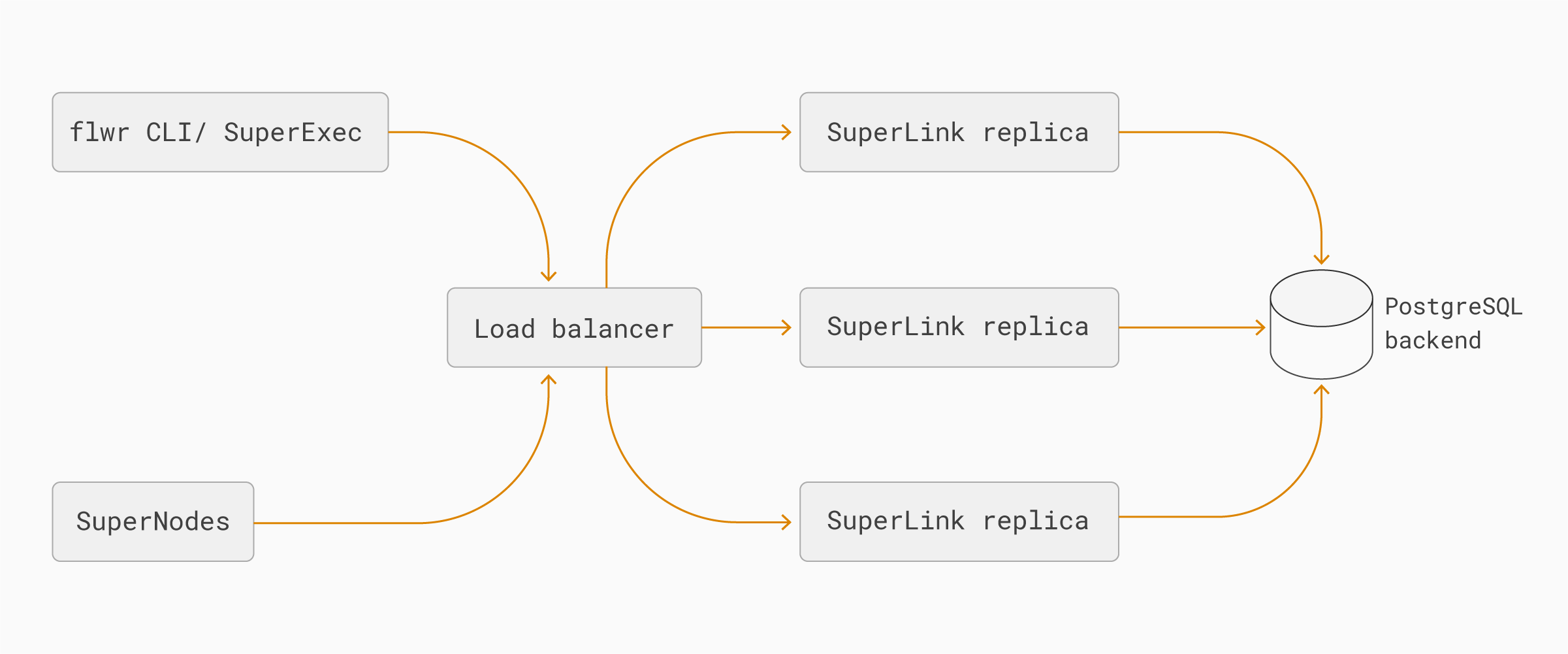
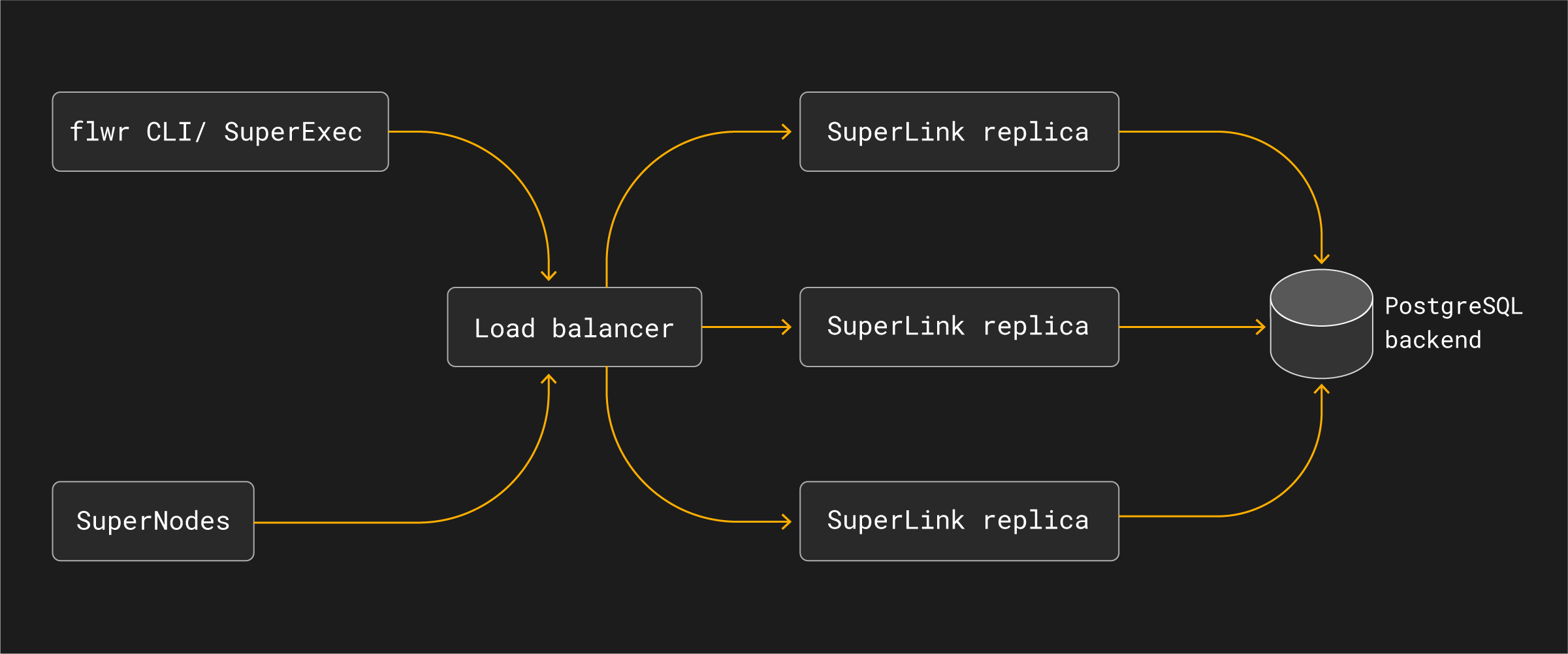
flowchart LR CLI["flwr CLI / SuperExec"] Nodes["SuperNodes"] LB["Load balancer"] SL1["SuperLink replica"] SL2["SuperLink replica"] SLN["SuperLink replica"] DB[("PostgreSQL backend")] CLI --> LB Nodes --> LB LB --> SL1 LB --> SL2 LB --> SLN SL1 --> DB SL2 --> DB SLN --> DB

The main components are:

  • Load balancer: exposes the stable SuperLink endpoint used by flwr CLI commands, SuperNodes, and SuperExec processes. It routes traffic only to healthy SuperLink replicas.

  • SuperLink replicas: run the same SuperLink service role in parallel. Any healthy replica can handle requests for the federation because state is externalized.

  • PostgreSQL backend: stores shared SuperLink state durably so replicas can observe the same runs, messages, node registrations, and object metadata.

  • SuperNodes and SuperExec: continue to connect to a SuperLink endpoint. They do not need to know which SuperLink replica handles an individual request.

Operational properties

High Availability Mode is designed to reduce the impact of losing an individual SuperLink process. If one SuperLink replica becomes unavailable, the load balancer can route new requests to another healthy replica while the shared PostgreSQL backend continues to provide the federation state.

This changes the deployment architecture of the SuperLink layer, but it does not change the Flower app programming model:

  • ServerApp and ClientApp code remains the same.

  • SuperNodes connect to the configured SuperLink endpoint, not to individual replicas.

  • Operators monitor and scale SuperLink replicas as part of the SuperGrid deployment.

  • The load balancer and PostgreSQL backend become critical infrastructure and must be operated with their own availability, backup, and monitoring strategy.

High Availability Mode should be understood as part of a production SuperGrid architecture. It improves resilience at the SuperLink layer, but end-to-end production availability still depends on the surrounding infrastructure, including load balancing, database availability, networking, authentication services, and application-level retry behavior.

Next
Flower Strategy Abstraction
Previous
Flower的架构
Copyright © 2026 Flower Labs GmbH
Made with Sphinx and @pradyunsg's Furo
On this page
  • SuperLink High Availability Mode
    • Architecture
    • Operational properties