Contents Menu Expand Light mode Dark mode Auto light/dark, in light mode Auto light/dark, in dark mode Skip to content
Flower Framework
Light Logo Dark Logo
main

Tutoriel

  • Qu’est-ce que l’apprentissage fédéré ?
  • Commencez avec Flower
  • Écrivez votre première application Flower
  • Écrivez votre première application Flower avec PyTorch
  • Utilisez une stratégie d’apprentissage fédéré
  • Personnalisez une Stratégie Flower
  • Communiquez des messages personnalisés.
  • Quickstart tutorials
    • Quickstart PyTorch
    • Quickstart TensorFlow
    • Quickstart MLX
    • Quickstart 🤗 Transformers
    • Quickstart JAX
    • Quickstart Pandas
    • Quickstart fastai
    • Quickstart PyTorch Lightning
    • Quickstart scikit-learn
    • Quickstart XGBoost
    • Quickstart Android
    • Quickstart iOS

Guide pratique

  • Build
    • Installez Flower
    • Configurez un pyproject.toml
    • Configurez un ClientApp
    • Concevoir des ClientApps étatiques
    • Utilisez les stratégies
    • Implémentez des stratégies
    • Aggréguez les résultats d’évaluation
    • Save and load model checkpoints
    • Utilisez les Mods intégrées
    • Utilisez la confidentialité différentielle
    • Implémentez FedBN
    • Utilisez l’sortie JSON CLI
    • Install Flower App dependencies at runtime
    • Guide de migration OpenFL
    • Passe à Flower 1.0
    • Mettez à niveau vers Flower 1.13
    • Mettre à niveau vers l’API Message
    • Mettez à niveau en Flower 1.28
  • Simulate
    • Exécuter Flower Localement avec un SuperLink Géré
    • Run simulations
  • Deploy
    • Exécuter Flower avec le Deployment Runtime
    • Activer les connexions TLS
    • Authentifier les SuperNodes
    • Configure logging
    • Exécuter Flower sur GCP
    • Exécutez Flower sur Azure
    • Exécutez Flower sur Red Hat OpenShift
    • Exécuter Flower sur plusieurs clusters OpenShift
    • Authentifier les comptes via OpenID Connect
    • Configurez l’enregistrement des audits
    • Gérer les fédérations Flower
    • Exécuter Flower à l’aide de Docker
      • Quickstart with Docker
      • Activer le TLS pour les connexions sécurisées
      • Conservation de l’État du SuperLink
      • Définir les Variables d’Environnement
      • Exécuter avec Privilèges Utilisateur Root
      • Exécuter ServerApp ou ClientApp en tant que Sous-Processus
      • Fixer une image Docker à une version spécifique
      • Utilisez une Version Différente de Flower
      • Démarrer rapidement avec Docker Compose
      • Exécuter les Exemples de Démarrage Rapide Flower avec Docker Compose
      • Déployer Flower sur Plusieurs Machines avec Docker Compose
    • Exécuter Flower en utilisant Helm
      • Déployer SuperLink
      • Déployer SuperNode
    • Créez et Gérez les Fédérations sur SuperGrid
    • Connecter des SuperNodes à la grille SuperGrid
    • Lancer des applications Flower

Explications

  • Federated Evaluation (évaluation fédérée)
  • Differential Privacy (confidentialité différentielle)
  • Secure Aggregation Protocols (protocoles d’agrégation sécurisée)
  • Flower Architecture (architecture de Flower)
  • SuperLink High Availability Mode
  • Flower Strategy Abstraction (abstraction Strategy de Flower)

Références

  • Reference
    • flwr
      • agentapp
        • AgentApp
        • AgentResponses
        • AgentSession
        • LoadAgentAppError
      • app
        • Array
        • ArrayRecord
        • ConfigRecord
        • Context
        • Error
        • Message
        • MessageType
        • Métadonnées
        • MetricRecord
        • RecordDict
      • clientapp
        • ClientApp
        • mod
          • adaptiveclipping_mod
          • arrays_size_mod
          • fixedclipping_mod
          • message_size_mod
          • LocalDpMod
      • serverapp
        • Grid
        • ServerApp
        • strategy
          • Bulyan
          • DifferentialPrivacyClientSideAdaptiveClipping
          • DifferentialPrivacyClientSideFixedClipping
          • DifferentialPrivacyServerSideAdaptiveClipping
          • DifferentialPrivacyServerSideFixedClipping
          • FedAdagrad
          • FedAdam
          • FedAvg
          • FedAvgM
          • FedMedian
          • FedProx
          • FedTrimmedAvg
          • FedXgbBagging
          • FedXgbCyclic
          • FedYogi
          • Krum
          • MultiKrum
          • QFedAvg
          • Result
          • Strategy
    • Flower CLI reference
    • Configuration Flower
    • Example projects
    • Télémétrie
    • Changelog
    • Flower Runtime Comparison
    • Communication réseau de Flower
    • Codes d’exit
      • [0] SUCCÈS
      • [1] SORTIE GRACIEUSE SIGINT
      • [100] SUPERLINK_THREAD_CRASH
      • [101] SUPERLINK_LICENSE_INVALID
      • [102] SUPERLINK_LICENSE_MISSING
      • [103] SUPERLINK_LICENSE_URL_INVALID
      • [104] SUPERLINK_INVALID_ARGS
      • [105] SUPERLINK_DATABASE_SCHEMA_MISMATCH
      • [2] GRACEFUL_EXIT_SIGQUIT
      • [200] SERVERAPP_STRATEGY_PRECONDITION_UNMET
      • [201] EXCEPTION_SERVERAPP
      • [202] ERREUR_D_AGGREGATION_STRATEGIE_SERVERAPP
      • [203] DEMARRAGE_DE_RUN_REFUSE_SUPERLINK
      • [250] ERREUR_COMMUNICATION_CLIENTAPP
      • [3] SORTIE_GRACEFUL_SIGTERM
      • [300] ADDRESSE_REST_SUPERNODE_INVALIDE
      • [302] CLÉ_D_AUTHENTIFICATION_SUPERNODE_INVALIDE
      • [303] SUPERNODE_DÉMARRÉ_SANS_TLS_MAS_AUTH_NODE_ACTIVÉ
      • [304] SUPERNODE_INVALID_TRUSTED_ENTITIES
      • [400] SUPEREXEC_INVALID_PLUGIN_CONFIG
      • [401] SUPEREXEC_AUTH_SECRET_LOAD_FAILED
      • [402] SUPEREXEC_INVALID_EXECUTOR_CONFIG
      • [500] FLWRCLI_NODE_AUTH_PUBLIC_KEY_INVALID
      • [600] COMMON_ADDRESS_INVALID
      • [601] COMMON_MISSING_EXTRA_REST
      • [602] COMMON_TLS_NOT_SUPPORTED
      • [603] COMMON_TLS_ROOT_CERTIFICATES_INCOMPATIBLE
      • [604] COMMON_PATH_INVALID
      • [605] COMMON_TLS_SERVER_CERTIFICATES_INVALID
      • [606] RUNTIME_VERSION_INCOMPATIBLE
      • [607] COMMON_APP_IMPORT_ERROR
      • [608] COMMON_RUNTIME_DEPENDENCY_INSTALLATION_ERROR
      • [700] EXCEPTION_SIMULATION
      • [701] SIMULATION_MISSING_EXTRA
      • [800] TASK_PROC_EXCEPTION
    • FAQ

Documents du contributeur

  • Contribuer
    • Contribuer sur GitHub
    • Devenez un·e contributeur·ice
    • Installer les versions de développement de Flower
    • Configurer un environnement virtuel
    • Utiliser les conteneurs VS Code Remote
    • Rédiger de la documentation
    • Publier Flower
    • Contribuer aux traductions
    • Comment construire des images Docker Flower localement
    • Migrer le schéma de base de données Flower
    • APIs publiques et privées
    • Bonnes premières contributions
  • main
🇬🇧 🇫🇷 🇨🇳 🇰🇷
Back to top
View this page

SuperLink High Availability Mode

SuperLink High Availability Mode is an architecture for running SuperLink without a single SuperLink process acting as the only entry point for a federation. Instead, traffic is routed through a load balancer to multiple SuperLink replicas that share durable state in a PostgreSQL backend.

Important

SuperLink High Availability Mode is available in preview. To discuss production requirements or request preview access, contact the Flower team at enquiries@flower.ai.

This page describes the architecture at a high level. It is not a deployment guide.

Architecture

In a standard Deployment Runtime setup, callers and SuperNodes connect to one long-running SuperLink. In High Availability Mode, callers and SuperNodes connect to a stable load-balanced endpoint. The load balancer distributes requests across multiple SuperLink replicas. Each replica reads and writes shared state through the same PostgreSQL backend, so the replicas observe the same federation, run, node, message, and object state.
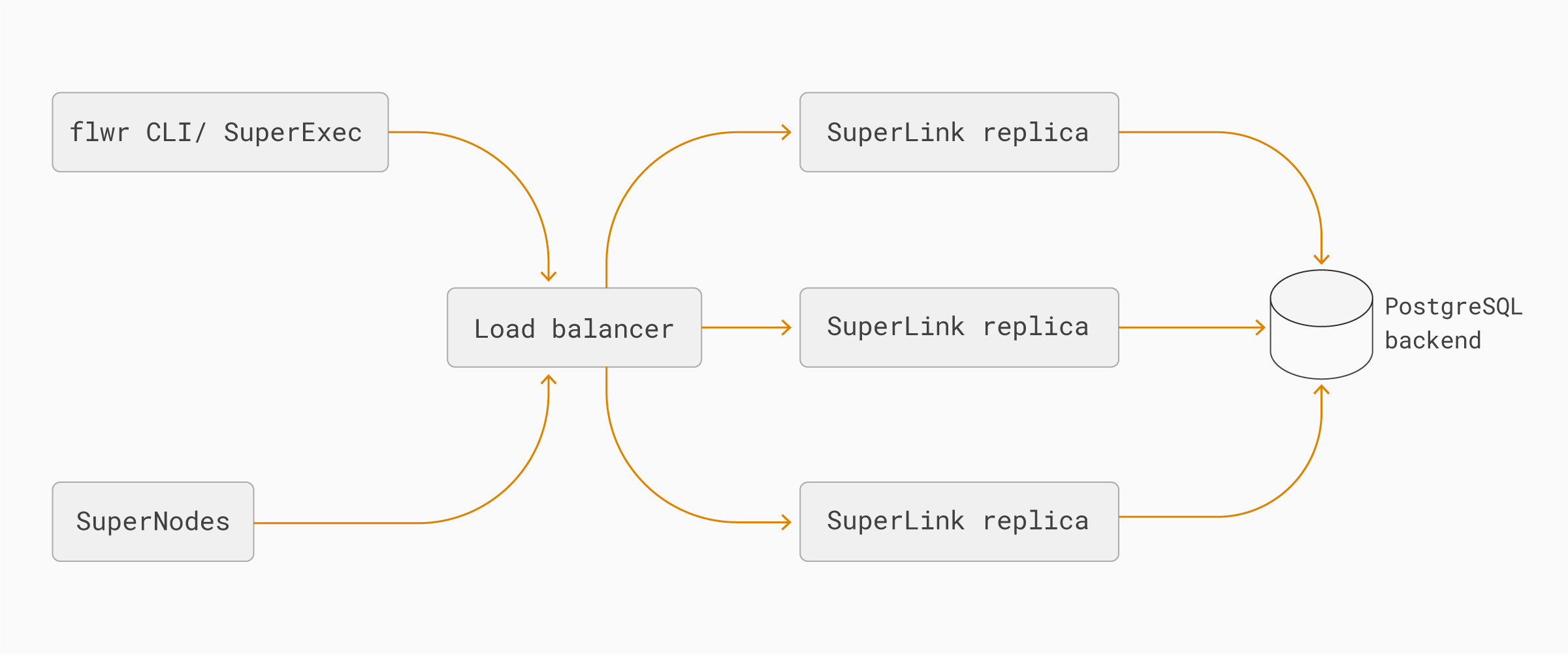
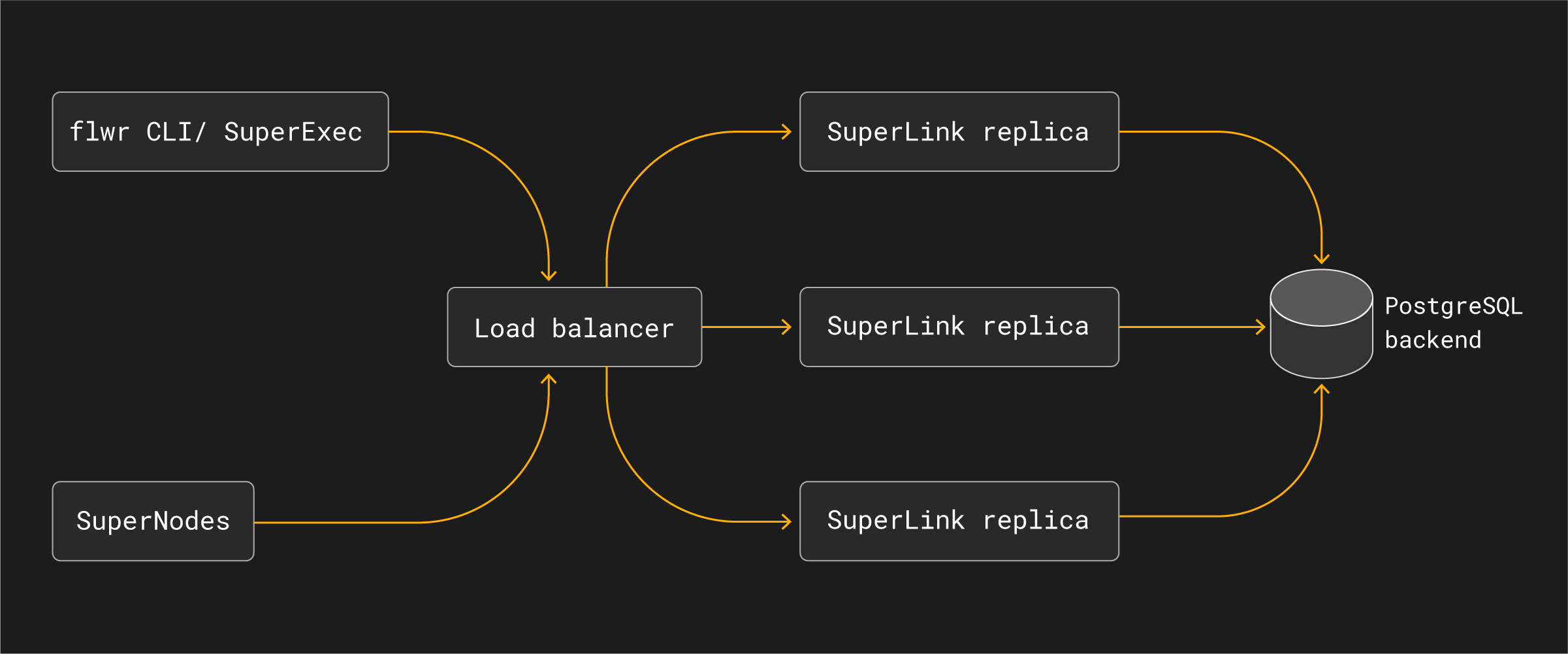
flowchart LR CLI["flwr CLI / SuperExec"] Nodes["SuperNodes"] LB["Load balancer"] SL1["SuperLink replica"] SL2["SuperLink replica"] SLN["SuperLink replica"] DB[("PostgreSQL backend")] CLI --> LB Nodes --> LB LB --> SL1 LB --> SL2 LB --> SLN SL1 --> DB SL2 --> DB SLN --> DB

The main components are:

  • Load balancer: exposes the stable SuperLink endpoint used by flwr CLI commands, SuperNodes, and SuperExec processes. It routes traffic only to healthy SuperLink replicas.

  • SuperLink replicas: run the same SuperLink service role in parallel. Any healthy replica can handle requests for the federation because state is externalized.

  • PostgreSQL backend: stores shared SuperLink state durably so replicas can observe the same runs, messages, node registrations, and object metadata.

  • SuperNodes and SuperExec: continue to connect to a SuperLink endpoint. They do not need to know which SuperLink replica handles an individual request.

Operational properties

High Availability Mode is designed to reduce the impact of losing an individual SuperLink process. If one SuperLink replica becomes unavailable, the load balancer can route new requests to another healthy replica while the shared PostgreSQL backend continues to provide the federation state.

This changes the deployment architecture of the SuperLink layer, but it does not change the Flower app programming model:

  • ServerApp and ClientApp code remains the same.

  • SuperNodes connect to the configured SuperLink endpoint, not to individual replicas.

  • Operators monitor and scale SuperLink replicas as part of the SuperGrid deployment.

  • The load balancer and PostgreSQL backend become critical infrastructure and must be operated with their own availability, backup, and monitoring strategy.

High Availability Mode should be understood as part of a production SuperGrid architecture. It improves resilience at the SuperLink layer, but end-to-end production availability still depends on the surrounding infrastructure, including load balancing, database availability, networking, authentication services, and application-level retry behavior.

Next
Flower Strategy Abstraction (abstraction Strategy de Flower)
Previous
Flower Architecture (architecture de Flower)
Copyright © 2026 Flower Labs GmbH
Made with Sphinx and @pradyunsg's Furo
On this page
  • SuperLink High Availability Mode
    • Architecture
    • Operational properties